Innovation Highlights
This release brings AI closer to your daily work. The new TrendMiner Agent sits inside your browser, understands what's on your screen, and helps you build an investigation as you go. Three new MCP tools give external AI assistants like Copilot, Claude, and ChatGPT deeper reach into your context data and monitor triggers. For teams already exploring AI with their process data, 2026.R3.0 turns that exploration into something practical. Both the Agent and the MCP Server are available today on request. Reach out to your TrendMiner contact to get started.
Furthermore, logarithmic scale support across TrendHub keeps the full signal visible when values span orders of magnitude, and a redesigned Query Designer lets admins build, test, and refine external data source queries one at a time instead of committing to everything upfront.
Under the hood, context data moves to time-based partitions, so queries on recent data stay fast no matter how many years of history you carry. Combined with targeted application enhancements, this release sharpens the tools you already use and opens new ways to work with your data.
Logarithmic scale support for time-series visualization
Some process values span several orders of magnitude, and on a linear axis the small values collapse into a flat line along the bottom of the chart. You can now switch a tag to a logarithmic axis, so its full range stays readable in a single view. Zero and negative values are still plotted, because TrendMiner uses a symmetric logarithmic scale that drops no data points from the chart.
Set the scale type per tag to Linear or Logarithmic, alongside the existing automatic and manual range settings. Your choice is remembered for your user and stored in the view, so dashboard tiles built on a saved TrendHub view show it too.
The scale type applies across TrendHub: the trend and stacked trend plots, the scatter plot, and the histogram bins.
A logarithmic scale can also be applied to a group of tags.
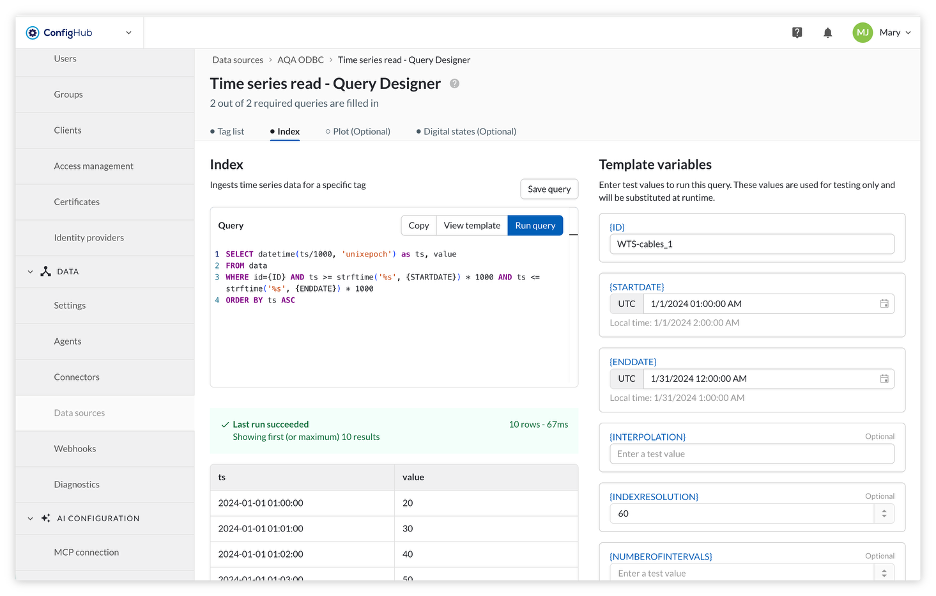
Query Designer for Generic O/JDBC data sources
Configuring a Generic JDBC or Generic ODBC data source used to mean committing to every query upfront, inside an all-or-nothing wizard, with no way to check the results before saving. The new Query Designer separates connection setup from query building, so ConfigHub admins can configure a data source, then build, test, and refine each query on its own.
What this unlocks:
Save a data source in draft while you work through its queries and activate it only once everything checks out.
Fill in template variables and run a live preview of each query before saving, with clear validation feedback the moment something's off.
Switch between queries without losing your preview results or variable values.
Context foundation improvements
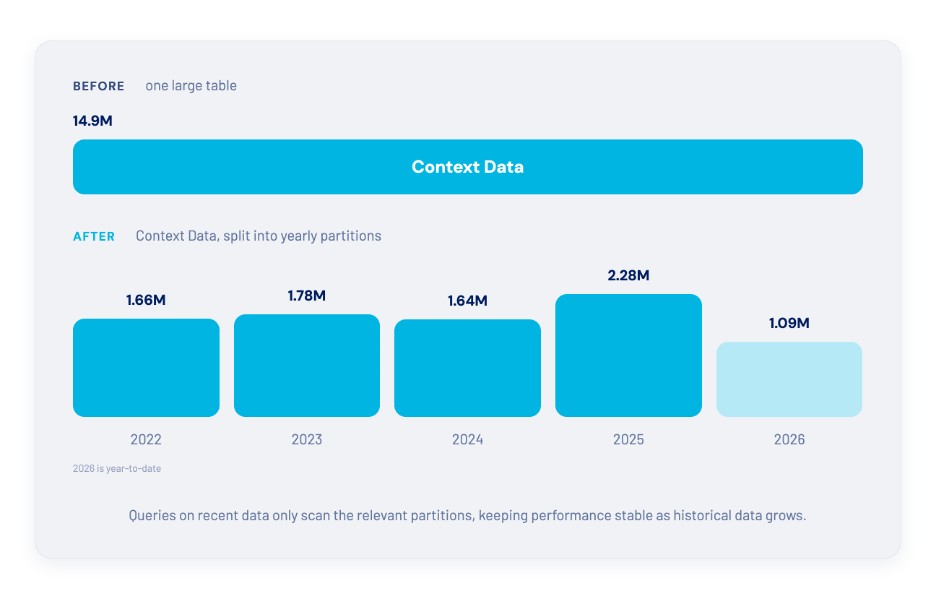
TrendMiner is built to keep performing as your history grows. This release takes that a step further by restructuring how context data is stored, splitting it into yearly partitions so that queries on recent data stay just as fast years from now as they are today.
This brings consistently fast queries on recent context data at any scale of history, backed by a foundation built to grow with your plant's history rather than around it. Nothing changes in how you use TrendMiner day to day, but this work strengthens context data integration in TrendMiner and your ecosystem.
Improved integrator endpoints
Connecting TrendMiner to Power BI, Databricks, and other systems in your data ecosystem just got more precise. New integration endpoints let external systems ask exactly the right question: what has changed since I last checked.
Built on this release's context foundational work, they let integrations sync incrementally by creation or last-modified date, a natural fit for how external systems already think about polling for updates.
New license format
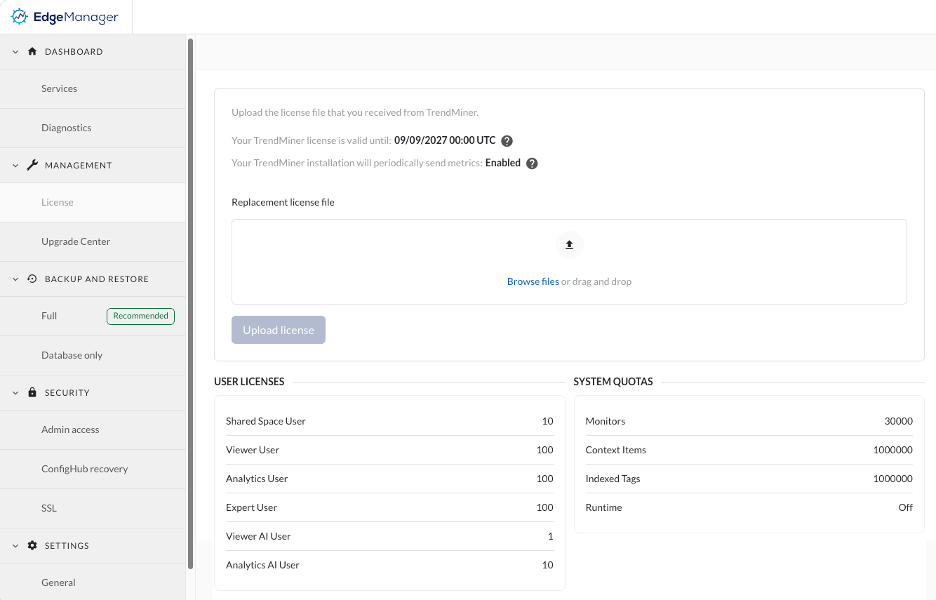
In preparation of the next versions of TrendMiner, where we will provide license assignment and enforcement, it is required to install a new license format that will include the defined contractual boundaries in relation to user types and system quotas, before the release of TrendMiner 2026.R4.0. This can be done at any time after upgrading to this 2026.R3.0 release.
It will be a required step before the instance can be upgraded to the next versions that will bring license assignments for users. After uploading the new license, you can verify the entitlements included in your license in EdgeManager. We will distribute new licenses to our customers before the next release. If you’d like to receive these early, please reach out to your TrendMiner contact.
AI - MCP Server
This release expands the MCP toolset with 3 new tools, giving your AI agent more data and more capabilities to act on insights.
TrendMiner's MCP Server connects your process data and analytics to the AI assistant your team already uses (Microsoft Copilot, OpenAI ChatGPT, or Anthropic Claude), so Process Engineers and Operators can ask questions in plain language and get answers based in your actual operating data.
New MCP tools released:
Discovery: search_context_types. Your AI agent can now discover which Context Types exist in your TrendMiner environment (batches, campaigns, shutdowns, etc.) before querying them, so it asks better follow-up questions and avoids guessing at naming conventions.
Data & Analysis: get_context_item. Pull the details of specific Context Items directly into the conversation. An Operator can ask "when was the last maintenance on Pump 12, and what was done?" and get the relevant context (start/end time, associated tags, notes) without leaving their chat window.
Data & Analysis: list_monitor_triggers. Your AI agent can list which monitors have triggered on a tag and when. A Process Engineer can ask "which alarms fired on Reactor 3 last week?" and get a straight answer instead of digging through the Monitor overview.
Note
The MCP Server is available today on request. Reach out to your TrendMiner contact to get started.
AI - TrendMiner Agent
TrendMiner brings AI to where you already work. Next to using TrendMiner tools and data in chat apps like Microsoft Copilot, Claude, or ChatGPT with our MCP connection, we are now launching the native TrendMiner Agent.
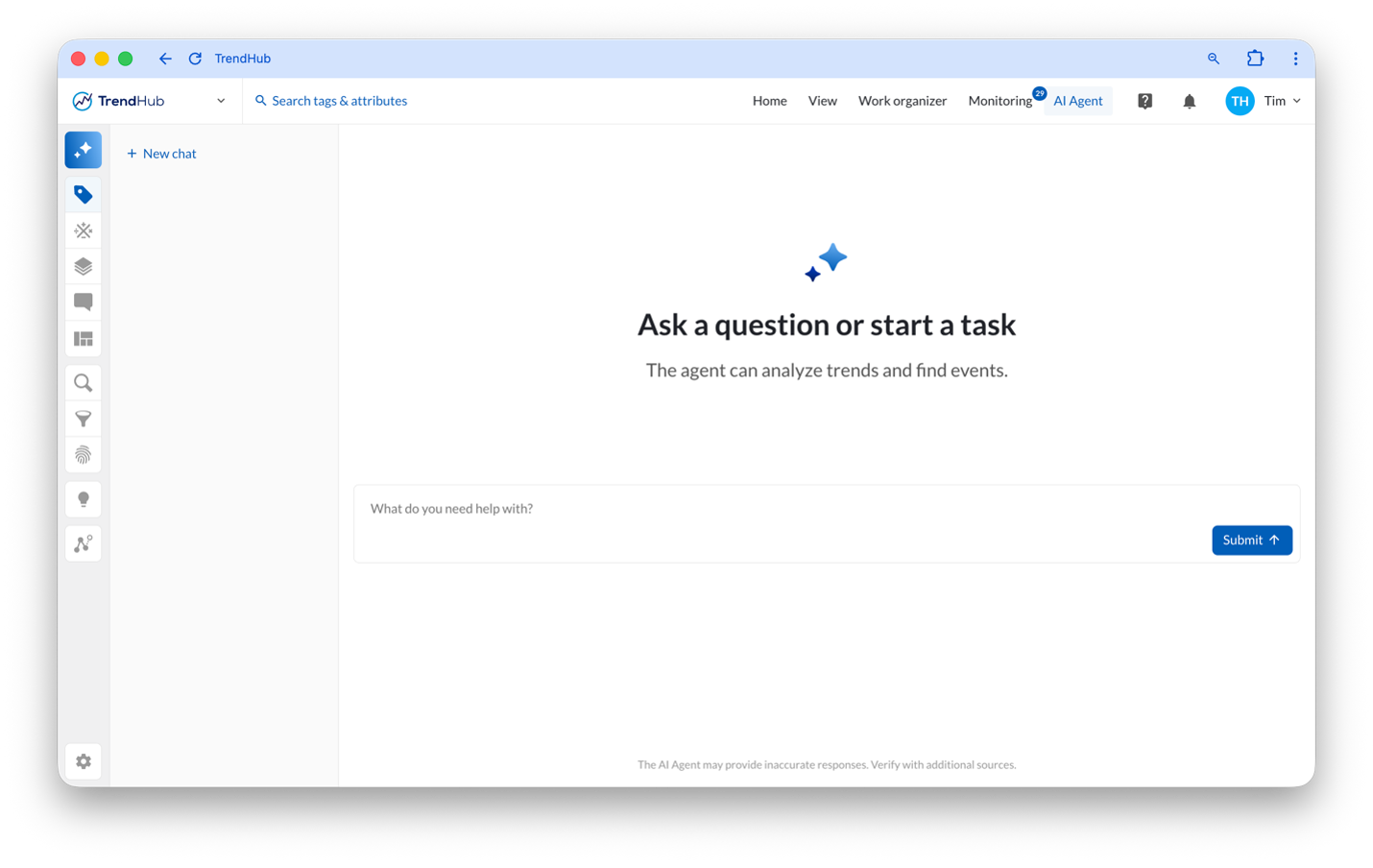
The Agent is embedded directly in TrendMiner, working alongside you in the browser, understanding what is on your screen and helping you build out an investigation as you go.
What the TrendMiner Agent can do
Analytics tools:
Navigate asset structures, search tags, and index info
Run value-based searches to find events matching specific criteria
Fetch tag data, calculate aggregations and run deeper time-series analyses
Search Context Items and navigate Context Types
Interactive tools:
Open views and navigate directly in TrendMiner
Add relevant tags to your TrendHub view, change the time range
Search and filter a Context view
Unlike a chat window on the side, the TrendMiner Agent doesn't just answer, it interacts with TrendMiner Application on the screen in front of you.
It is also your personal TrendMiner expert, that answers practical "how do I" questions on working in TrendMiner, explaining users how to build a formula, guiding you how to use a feature. Just ask the question, instead of browsing through documentation.
Bring your own model
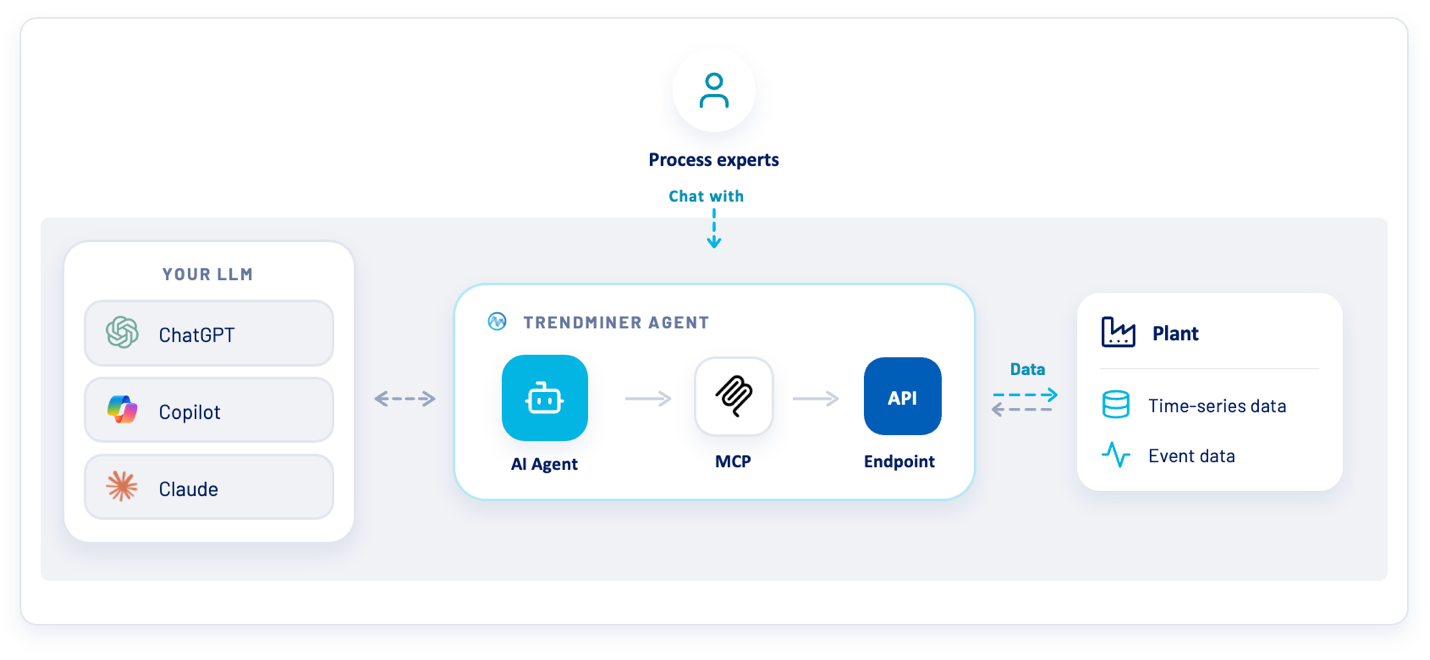
The Agent connects to your LLM. It uses the models like Claude Sonnet 5, ChatGPT 5.6 Luna, … from providers like Azure Foundry, Anthropic and later there will be support for AWS Bedrock and OpenAI. Providers that your organization already trusts, so there's no new vendor to onboard and your data remains within your company landscape.
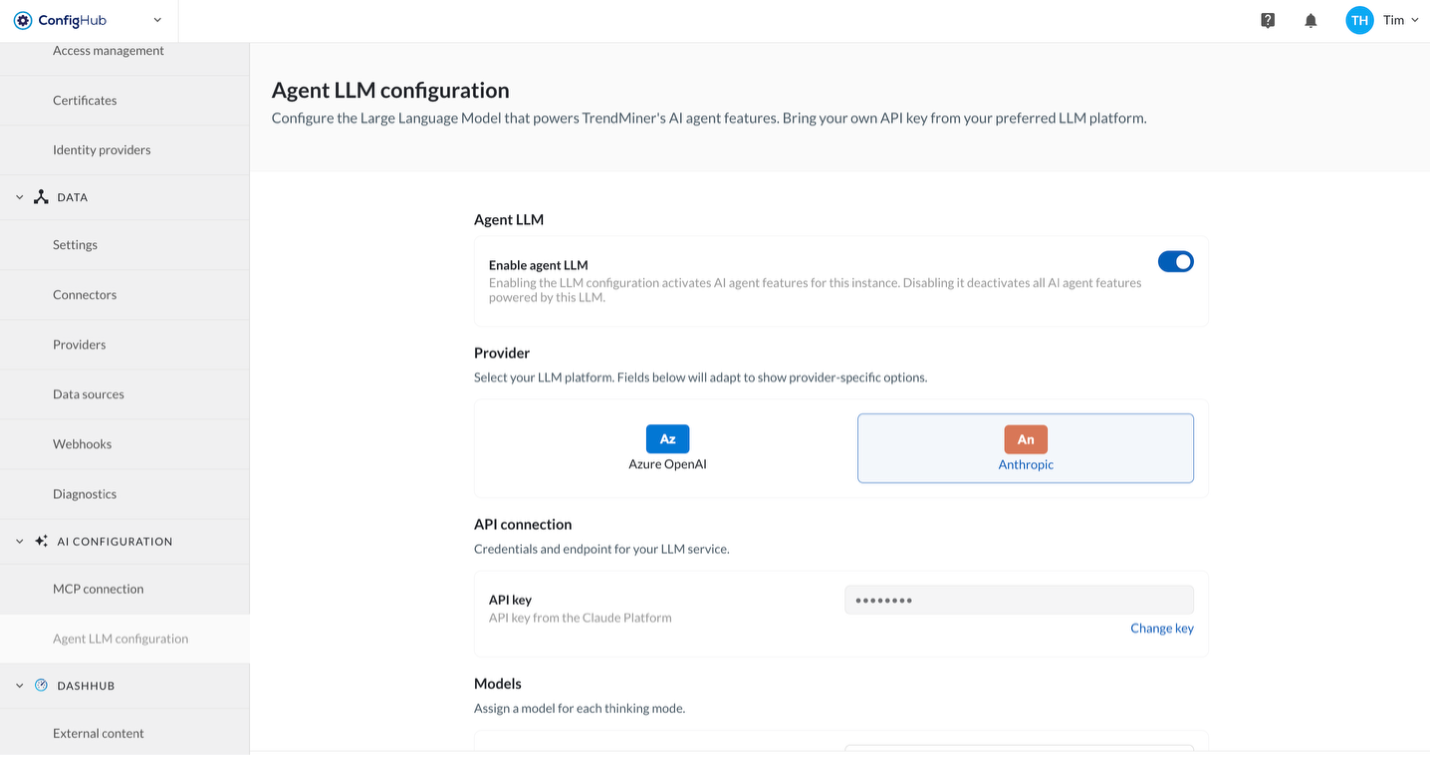
This is the first release and the starting point for agentic capabilities in TrendMiner.
Note
The TrendMiner Agent is available today on request. Reach out to your TrendMiner contact to get started.